See your orders in Google Sheets
Paste one formula into a new Google Sheet and every new order appears there by itself. No code.
- Settings → Google Sheet → Copy.
- Open a new Google Sheet, click cell A1, paste, press Enter.
- Done – it updates by itself about every hour.
-
1Copy your formula
In Bamsell go to Settings → Google Sheet and tap Copy.
-
2Paste it into a new sheet
Open a new Google Sheet (type sheets.new in your browser), click cell A1, paste and press Enter. From then on every new order appears: Order ID, the date and time it came in (your country’s time), customer, phone, item, amount, status, rider and more. Old orders aren’t added.
-
3It keeps itself up to date
Google refreshes it by itself about every hour, so new orders and status changes show up without doing anything. Bamsell stays the main record; the sheet is a copy. Want your own notes? Add them in a second tab so they never shift.
-
4Keep it private
Anyone who has the formula can see your orders. If it was shared by mistake, tap Make a new link in Settings and paste the new formula – the old one stops working straight away.
-
5Excel instead?
In Excel: Data → From Web, paste the link inside the quotes of the formula (starting with https://), and choose Load.
-
6Advanced: rows added instantly into a sheet you already use
Only if you need each order to land in your own sheet layout the second it arrives. Open (or create) the Google Sheet. Click Extensions → Apps Script. Delete everything in the editor.
-
7Paste the script
Copy the script below, paste it in and click Save. It adds a row to the tab called Orders for every new order. It reads your header row and fills the matching columns (Order ID, Customer Name, Phone Number, State, Item Ordered, Quantity, Amount, Status, Notes, Order Date/Time…), so your own layout keeps working. No Orders tab? It creates one.
// Bamsell → Google Sheet (v2): adds one row for every new order to the "Orders" tab, and can send a whole month at once.
// It reads your header row and fills the matching columns, so it works with your own layout.
// No "Orders" tab yet? It creates one with standard headers.
var COLUMNS = {   // what Bamsell sends → header names it looks for (any case, spaces ignored)
  order_id: ['order id', 'order no', 'order number', 'id', 'ref'],
  name: ['customer name', 'name', 'customer', 'full name'],
  phone: ['phone number', 'phone', 'phone no', 'mobile', 'number'],
  whatsapp: ['whatsapp', 'whatsapp number'],
  email: ['email', 'email address'],
  state: ['state', 'region', 'location'],
  address: ['address', 'delivery address'],
  city: ['city', 'area', 'city / area'],
  item: ['item ordered', 'product', 'item', 'product ordered', 'items'],
  package: ['package', 'offer'],
  qty: ['quantity', 'qty', 'units'],
  amount: ['amount', 'price', 'total', 'amount (₦)', 'amount (gh₵)'],
  delivery_fee: ['delivery fee', 'rider fee', 'fee'],
  status: ['status', 'order status'],
  rider: ['delivered by (rider)', 'rider', 'delivered by', 'rider name'],
  notes: ['notes', 'note', 'comment', 'comments'],
  date: ['order date/time', 'order date', 'date', 'date/time', 'time'],
  country: ['country']
};
var DEFAULT = ['Order ID', 'Customer Name', 'Phone Number', 'State', 'Address', 'Item Ordered', 'Quantity', 'Amount', 'Delivery Fee', 'Status', 'Delivered By (Rider)', 'Notes', 'Order Date/Time'];

function key_(s) { return String(s || '').toLowerCase().replace(/\s+/g, ' ').trim(); }
function text_(v) { return v === undefined || v === null ? '' : v; }

// Bamsell sends one order, or {rows: [...]} for a whole month. An Order ID already in the sheet is updated, not added again.
function doPost(e) {
  var d = JSON.parse(e.postData.contents);
  var list = d.rows || [d];
  var lock = LockService.getScriptLock(); lock.waitLock(30000);
  var added = 0, updated = 0;
  try {
    var ss = SpreadsheetApp.getActiveSpreadsheet();
    var sh = ss.getSheetByName('Orders') || ss.insertSheet('Orders');
    if (sh.getLastRow() === 0) sh.appendRow(DEFAULT);
    var width = Math.max(sh.getLastColumn(), 1);
    var head = sh.getRange(1, 1, 1, width).getValues()[0].map(key_);
    var colOf = {}, used = {};
    Object.keys(COLUMNS).forEach(function (field) {
      for (var i = 0; i < COLUMNS[field].length; i++) {
        var c = head.indexOf(COLUMNS[field][i]);
        if (c >= 0 && !used[c]) { colOf[field] = c; used[c] = true; return; }
      }
    });
    // Rows already in the sheet, by Order ID
    var rowOf = {}, last = sh.getLastRow();
    if (colOf.order_id !== undefined && last > 1) {
      sh.getRange(2, colOf.order_id + 1, last - 1, 1).getValues().forEach(function (r, i) { var id = String(r[0]).replace(/^'/, '').trim(); if (id) rowOf[id] = i + 2; });
    }
    var fresh = [];
    list.forEach(function (o) {
      var values = {
        order_id: o.order_id ? "'" + o.order_id : '', name: o.name, phone: o.phone ? "'" + o.phone : '', whatsapp: o.whatsapp ? "'" + o.whatsapp : '', email: o.email,
        state: o.state, address: o.address, city: o.city, item: o.product || o.package, package: o.package,
        qty: o.qty, amount: o.amount, delivery_fee: o.delivery_fee || '', status: o.status, rider: o.rider || '',
        notes: o.notes || '', date: o.date, country: o.country
      };
      var at = rowOf[String(o.order_id || '').trim()];
      if (at === -1) return;   // already added in this same batch
      if (at) {   // already there: bring it up to date, keep anything you typed where Bamsell has nothing
        var cur = sh.getRange(at, 1, 1, width).getValues()[0];
        Object.keys(colOf).forEach(function (f) { var v = text_(values[f]); if (v !== '') cur[colOf[f]] = v; });
        sh.getRange(at, 1, 1, width).setValues([cur]);
        updated++;
      } else {
        var row = head.map(function () { return ''; });
        Object.keys(colOf).forEach(function (f) { row[colOf[f]] = text_(values[f]); });
        fresh.push(row);
        if (o.order_id) rowOf[String(o.order_id).trim()] = -1;   // the same order twice in one batch: add once
        added++;
      }
    });
    if (fresh.length) sh.getRange(sh.getLastRow() + 1, 1, fresh.length, width).setValues(fresh);
  } finally { lock.releaseLock(); }
  return ContentService.createTextOutput('ok:' + added + ',' + updated);
}

// Run this once from the editor (choose testRow → Run) to check it works: it adds a test row.
function testRow() {
  doPost({ postData: { contents: JSON.stringify({ order_id: 'TEST-1', name: 'Test Customer', phone: '08030000000', state: 'Lagos', product: 'Test Product', package: '2 Packs', qty: 2, amount: 10000, status: 'New', date: new Date().toISOString() }) } });
}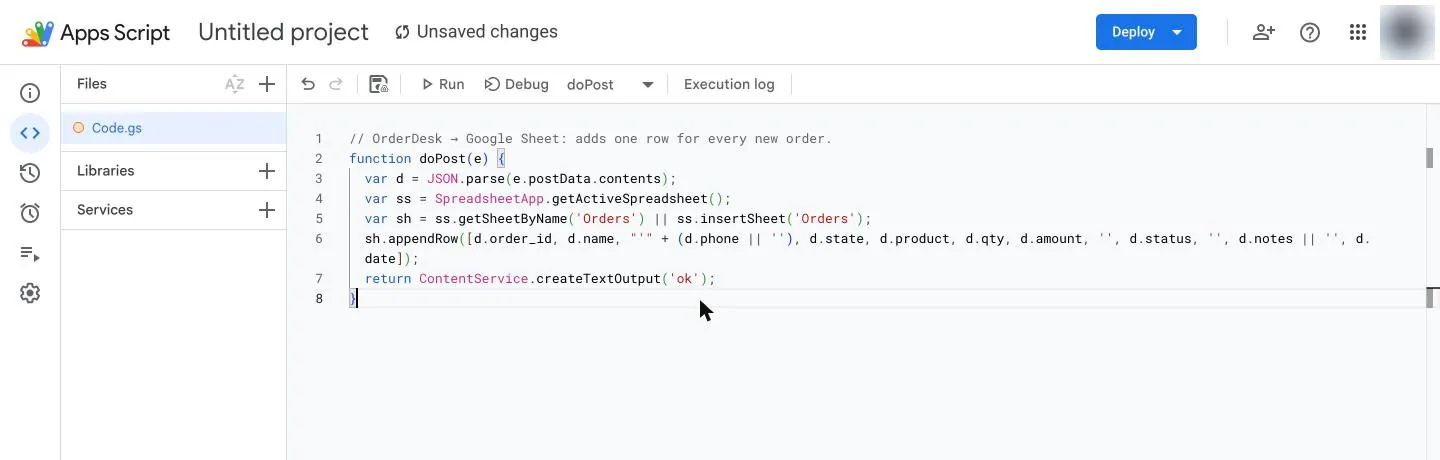
Apps Script: paste the script and click Save -
8Deploy it as a web app
Click Deploy → New deployment. Click the gear next to “Select type” and choose Web app. Set Execute as: Me and Who has access: Anyone. Click Deploy, then Authorize access and allow it.

Apps Script: Deploy → New deployment 
Click the gear next to Select type → Web app 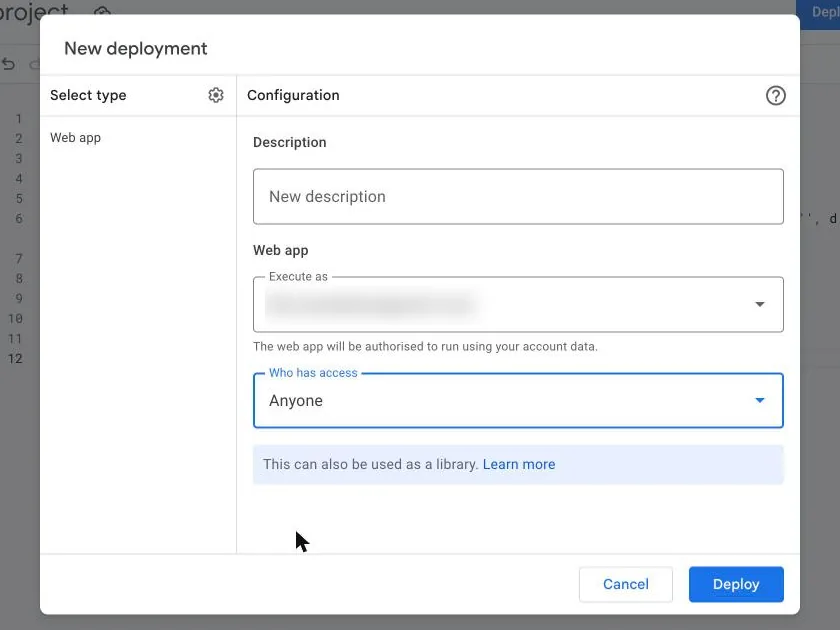
Execute as: Me · Who has access: Anyone → Deploy -
9Copy the link into Bamsell
Copy the Web app URL (it ends with
/exec). In Bamsell go to Settings, paste it into Also send each new order to a Google Sheet and save.
In Bamsell -
10Test
Back in Settings, tap Send a test row. “It works!” means a test row is in your Orders tab (delete it). If not, the message says exactly what to fix. Changed the script later? Deploy → Manage deployments → ✏️ Edit → Version: New version → Deploy, or Google keeps running the old one.